PassTracker is now Tally Volleyball. Same app, same account, same stats. What changed →
TallyVolleyball
Free in beta ยท no card

Every touch, tallied.

Tap once for every pass at practice and see your passers ranked before you set the lineup. Serving, hitting, match night and player development live in the same app.

On a phone, an iPad or a laptop. Nothing to install, nothing to film or upload.

1Tap once per pass

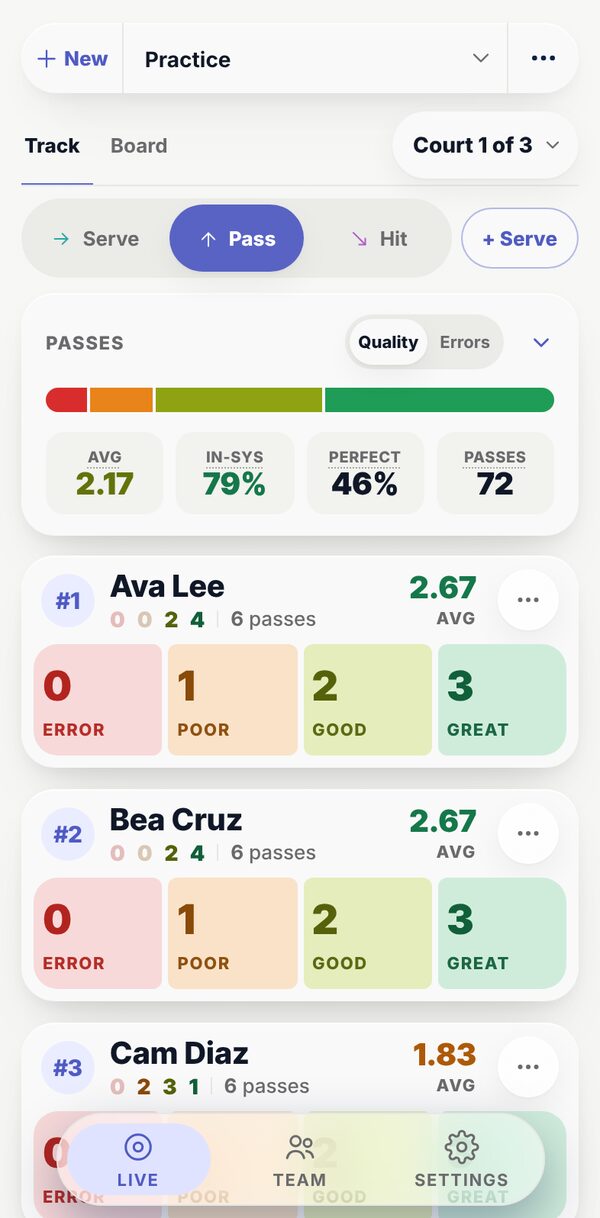
A practice in Tally on a phone: each player's card with four buttons, Error, Poor, Good and Great, under the team's passing so far.

2See who’s passing best

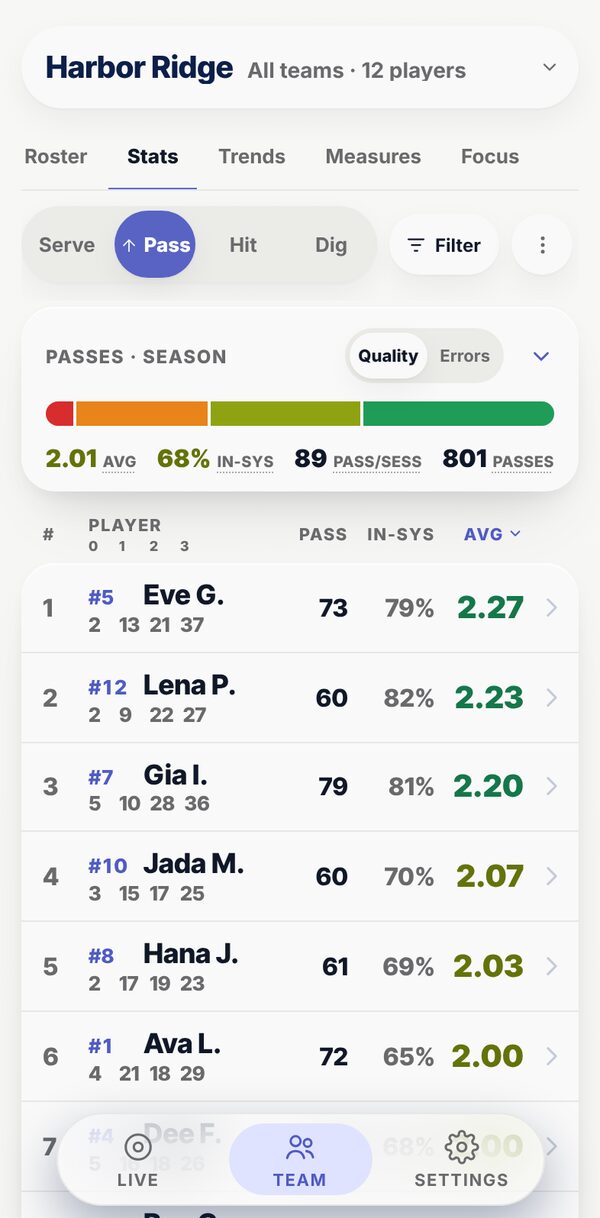
Team, Stats on a phone: the passers ranked by their average, best first, with each one's passes and in-system rate.
1 tapper touch, with no player to pick first
3 tapsper jump on a testing day: the foot, the inch, save
2 secondsor so for every other screen to catch up with the court
0 barsof signal needed: taps save on the device first

One app, the whole season

Match night, practice and player development.

The match court on a phone, with the question after a point: how did they score?
Match night

Run the match on a live court.

  • Score, rotation and subs move as you tap
  • A second screen says who to serve
  • See where their kills land, rotation by rotation
See match night →
Compact player cards in a practice: every player on one screen with their buttons beside their name
Practice

Every rep on one screen.

  • The whole roster fits on a phone, one row each
  • Serve and pass on the same card
  • Up to seven courts, each with its own group
See practice →
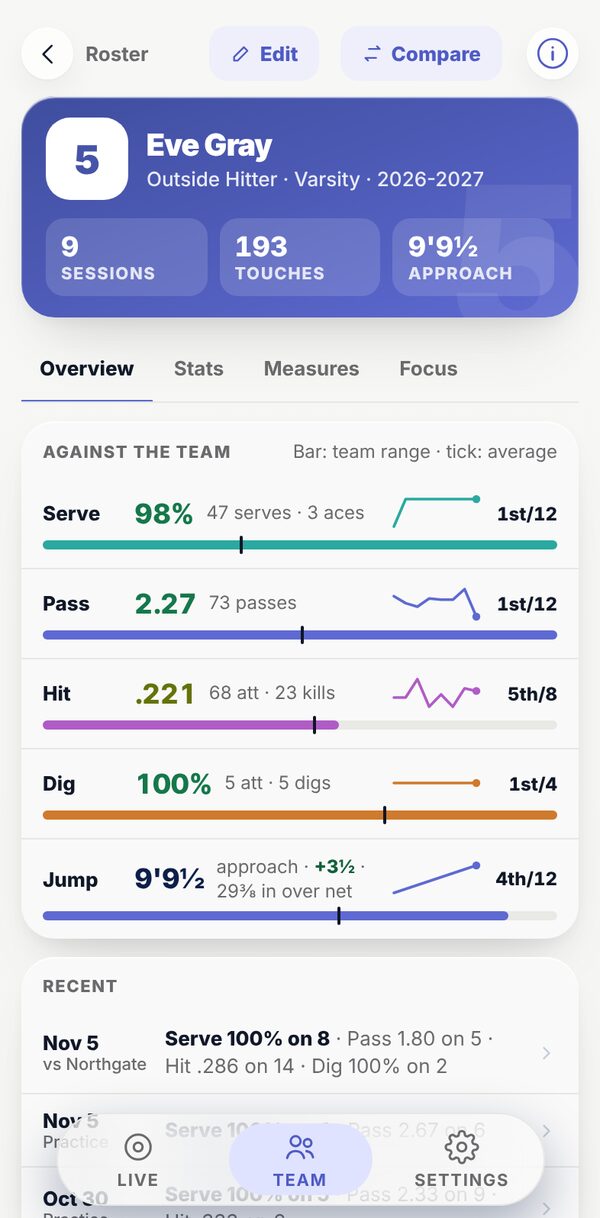
A player's page: their season against the team, recent sessions and what they are working on
Player development

Measure them. Coach them.

  • Verticals, reaches and speeds on testing days
  • Each player's #1 thing to work on, with the drill
  • A page per player that shows the whole season
See player development →

Built for the speed of a rally

Faster than the clipboard, and live while the ball is still up.

Every number goes in with as few taps as a coach has time for: one per touch in a rally, three per jump on a testing day, and none to share it with the bench.

1tap

Per touch, mid-rally

Every player carries their own buttons, so there is no player to pick first. On the match court an ace, a kill or an error scores the point as well.

  • Tap the rating
  • the score moves
  • the rotation moves
Player cards in a practice: each player's name with their own rating buttons

3taps

Per jump on a testing day

The foot, the inch, then Save or a half. The next player in line comes up on their own, and the next station opens when everyone is done.

  • 7 ft
  • 10
  • Save
  • next player
The measuring pad: the line of players, each one's last figure, and the foot and inch keys

2sec

To every other screen

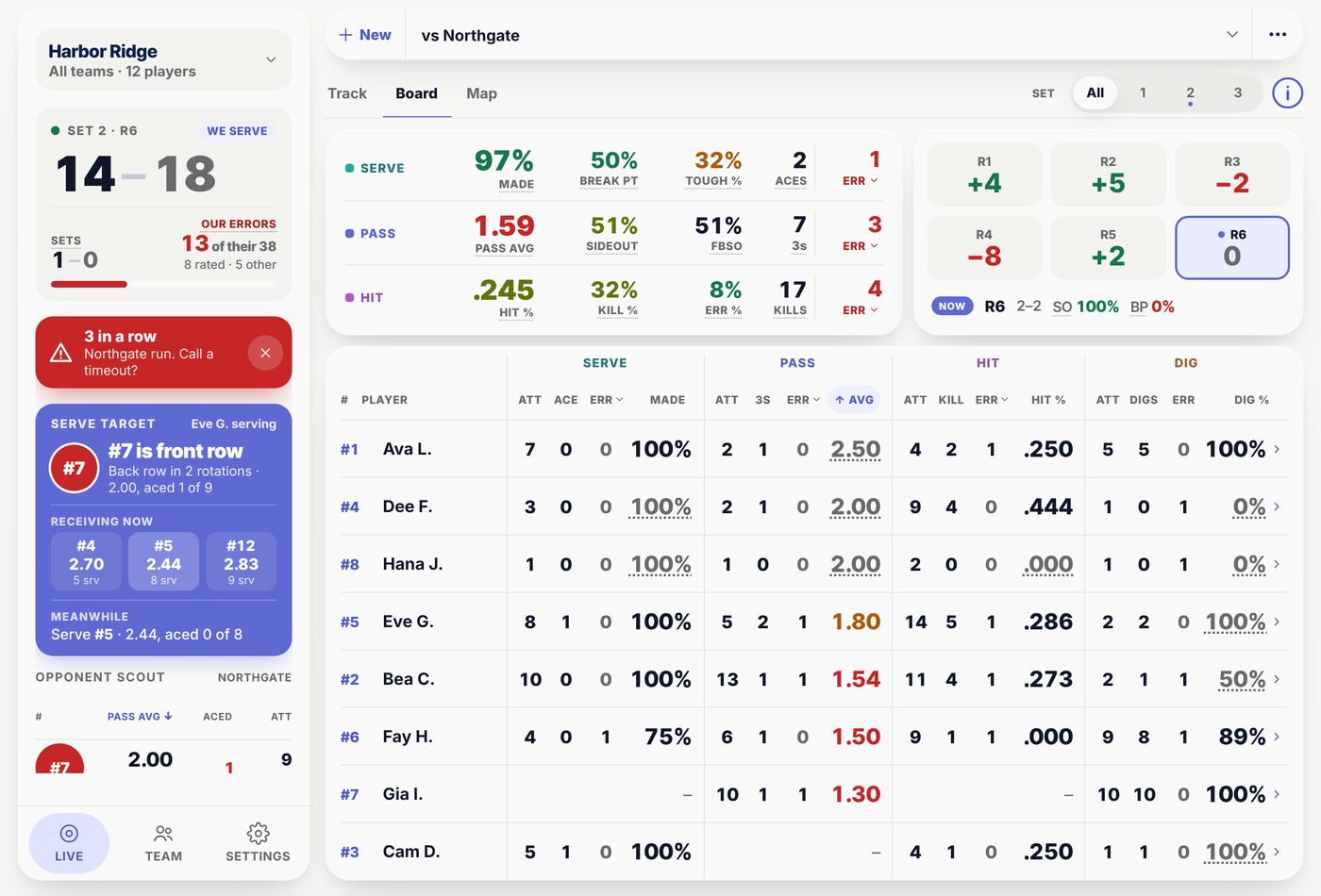
The Board and the Map on a second phone, iPad or laptop catch up in about two seconds, with the serve target and the timeout alert already worked out.

  • a tap on the court
  • on the bench's screen
The Map on a phone: where their kills land, their hitters and how they score

Real time

From the tap on the court to the bench's screen in about two seconds.

One coach taps on a phone. The head coach reads the Board on an iPad. Nobody waits for film, and nobody counts a rally twice.

The match court on a phone: the six as name plates, the selected player's buttons below
  1. Tap: Ace14 to 18 becomes 15 to 18
  2. Saved on the phoneEven with no signal in the gym
  3. On the BoardAbout two seconds later, with the serve target and the run alert updated
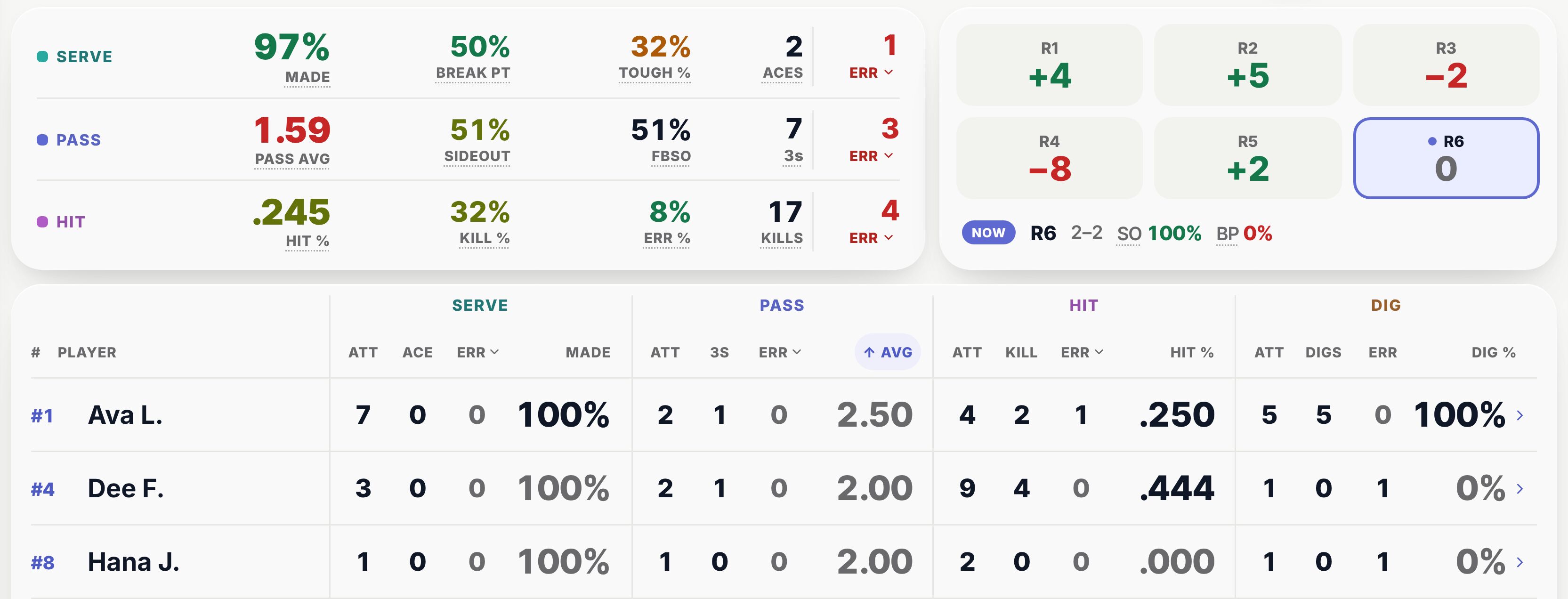
The Board on an iPad: the score, the team's serving, passing and hitting, the six rotations, a timeout alert, the serve target and every player's line
  • 1One taps, everyone reads. The Board and the Map log nothing, so any number of phones can watch the same match.
  • 2Who to serve, which rotation. The receiver your serves are hurting, plus or minus for all six rotations, and the one to start the next set in.
  • 3Mistakes stay small. Change any of the last ten ratings, or take back a point from three rallies ago.

The Map

See where their kills land, while the match is on.

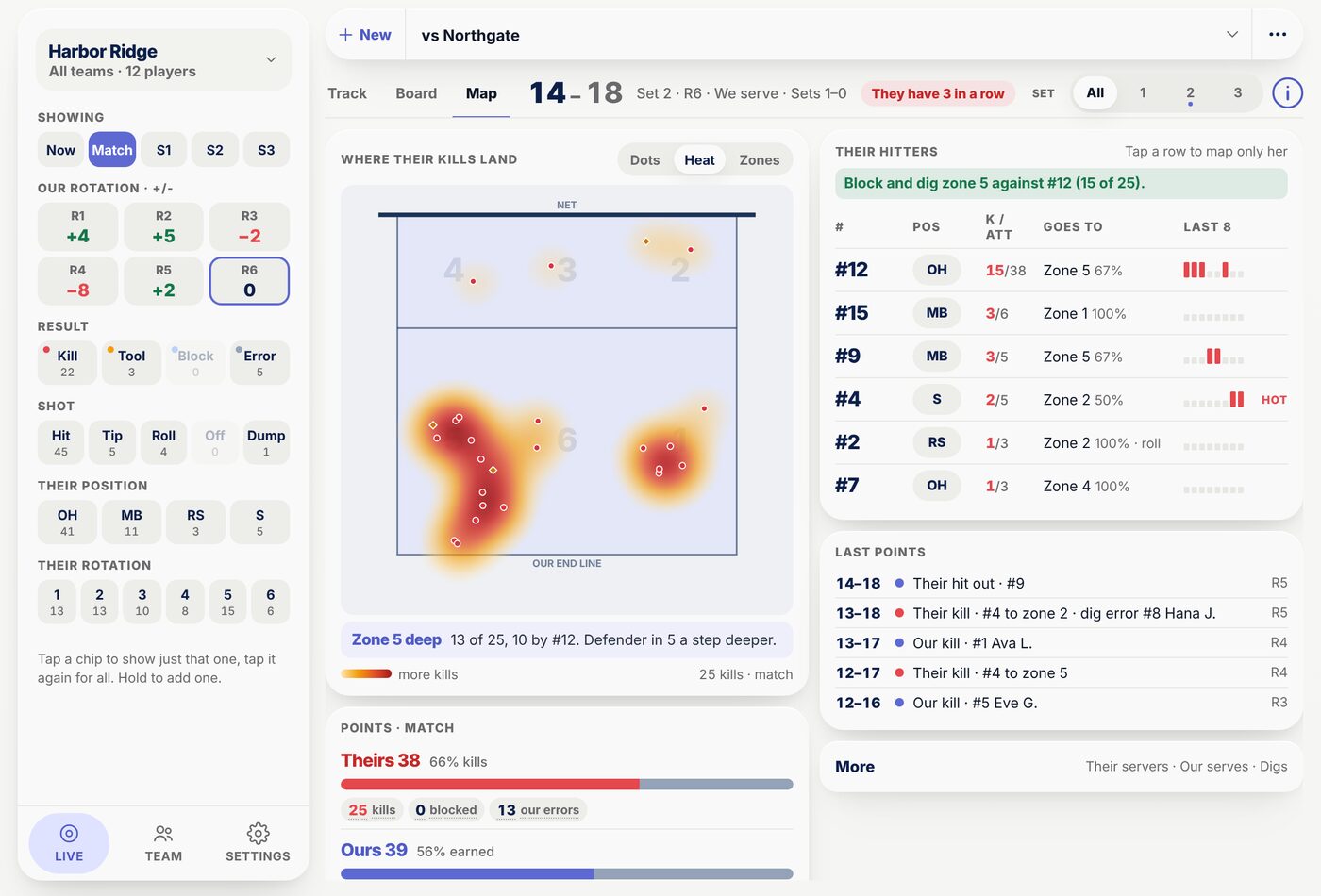
After a point, tap where their kill landed and who hit it, or skip the question. The Map turns it into their hottest zone, their hitters by kills over attempts, and the block and dig call to make before the next rotation.

The Map on an iPad: a heat map of their kills with the deep zone called out, and their hitters by kills over attempts

Season progress

See the season move, not just the last match.

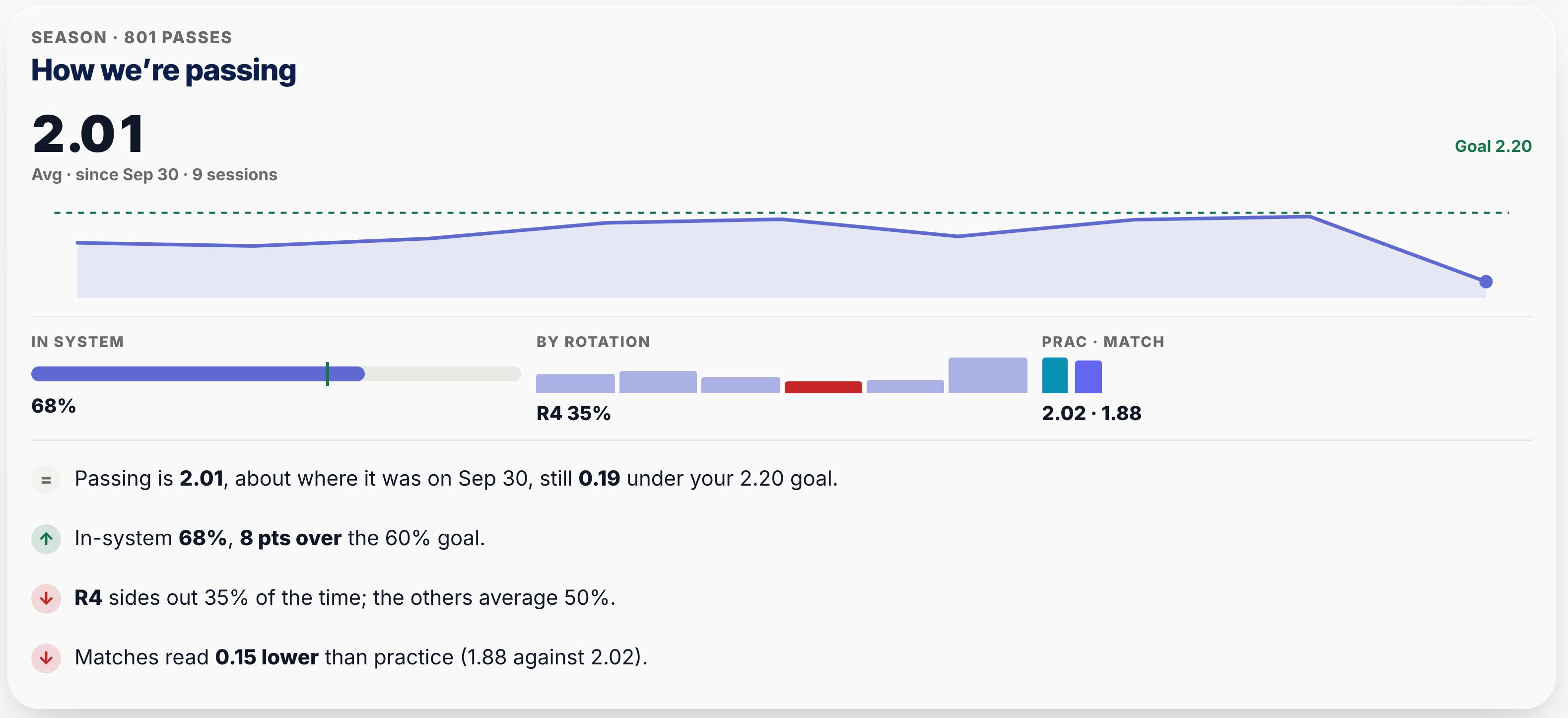
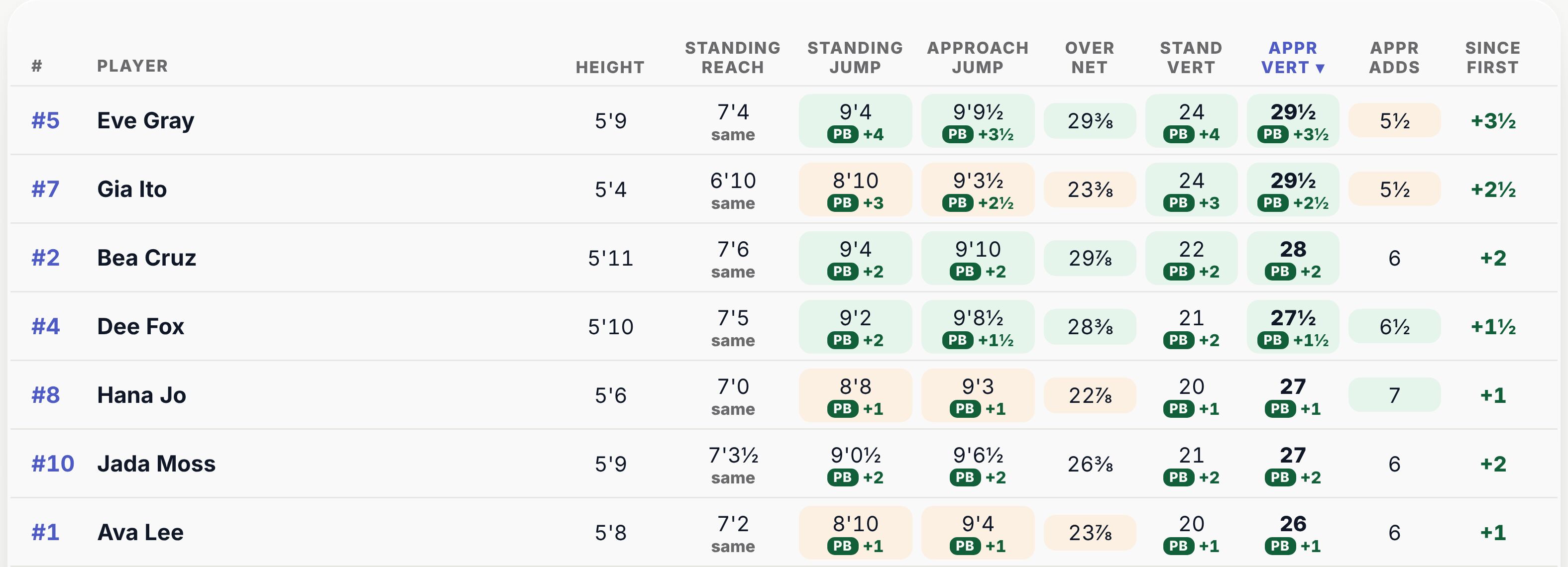
Every practice, match and testing day lands on one timeline. Trends say what changed in a sentence, and Measures puts each player's change since last time beside the team's.

  1. Sep 22First testing day, 12 players
  2. Sep 30First practice tracked
  3. Every practice720 passes rated, one tap each
  4. Oct 27Second testing day: 12 new bests
  5. Nov 5vs Northgate, the leaking rotation flagged
Team, Trends on a laptop: how the team is passing, its line by session against the goal, and what changed in sentences
Team, Measures: each player's reach, jumps and verticals with the change since last time

New: player development

The stats tell you who. Now see how they grow.

Run a testing day by station or by player, with several coaches at once: twelve players, three measures and 84 tries took 254 taps on our sample team. Tally works out every vertical, checks each jump against the net and every player's best, and keeps a short list of what each one is working on, with the drill and the cue.

A player's Measures: the approach jump by date, the vertical, over the net and the rank on the team
The summary after measuring: every player's best, both verticals and the new bests

Practice

A whole practice on one phone.

Compact cards put every player on screen with their buttons beside their name. Turn on Serve + Pass and each player gets both rows, so a serve-receive drill logs the server and the passer without switching anything.

  • ✓Up to seven courts. Split the team across nets by position in one tap; each court logs its own group.
  • ✓Fix one tap. Change any of the last ten ratings without undoing the ones after it.
Compact cards with Serve + Pass: every player has a serve row and a pass row
Split across courts: three courts, each player's court one tap away

For parents and the gym TV

One link. No account. Big enough to read from the bleachers.

Share a read-only leaderboard with parents, or open it on the gym TV between drills: full names, big numbers, every skill you track. You choose what it shows, and you can turn the link off any time.

The leaderboard on a 1920 by 1080 gym TV: every player ranked by passing average, with full names, filling the screen
The parents' leaderboard on a phone

Who it is for

Built for the coach on the bench, and the director running the club.

For coaches

Fast enough for a live rally. Clear enough for a timeout.

  • One tap per touch, with no player to pick, on a phone or an iPad.
  • Who to serve and which rotation is leaking, on a second screen during the match.
  • Testing days in three taps a jump, verticals and new bests worked out.
  • Each player's #1 thing to work on, with the drill and the cue.
The Board on a laptop: the team's figures, the six rotations and every player's line

For club directors

Every team, every coach, one organization.

  • All your teams in one place. Switch between 14U and 18U, or read the whole club at once.
  • Staff with the right access. Invite with one link; a coach can be limited to the teams you give them.
  • Seasons that carry over. Start a new season with last year's roster and keep every player's history.
  • Parents see a link, not your data. A read-only leaderboard you can turn off any time.
  • Your data stays yours. Export everything as a spreadsheet or a full backup; backups also run on their own.
OwnerThe organization and every admin
AdminTeams, staff and settings
EditorTracks and measures
ViewerReads, logs nothing

Questions directors ask →

Why switch

Keep the tally without the clipboard.

Tally marks on paper tell you who passed. They do not tell you which rotation is losing, who to serve, or whether anyone is jumping higher than in August.

What you getClipboardFilm-based statsTally
Stats while the match is onNoAfter the film is processedYes, as you tap
Who to serve, and where their kills landNoAfter the matchDuring it
Testing days and each player's focusA separate sheetNoYes, on the player's page
Something to film, upload and wait forNothingEvery matchNothing
Your whole staff on one live rosterNoVariesYes, one invite link
  • Stats while the match is on

    Tally
    Yes, as you tap
    Clipboard
    No
    Film-based stats
    After the film is processed
  • Who to serve, and where their kills land

    Tally
    During it
    Clipboard
    No
    Film-based stats
    After the match
  • Testing days and each player's focus

    Tally
    Yes, on the player's page
    Clipboard
    A separate sheet
    Film-based stats
    No
  • Something to film, upload and wait for

    Tally
    Nothing
    Clipboard
    Nothing
    Film-based stats
    Every match
  • Your whole staff on one live roster

    Tally
    Yes, one invite link
    Clipboard
    No
    Film-based stats
    Varies

Pricing

Free

Everything, for every coach on your staff, while we finish the beta. No card to start.

  • 30 days' noticeBefore any paid plan starts, every beta team hears at least a month ahead.
  • A free plan for one teamOne team will always be able to use Tally free.
  • Your data leaves when you doExport everything as a spreadsheet or a full backup, any time.

Questions

Coaches ask us this.

How does Tally rate each touch?

One tap. During the rally you tap the button for the touch that just happened: 0 to 3 for a pass, 0 to 4 for a serve, error, hit or kill for an attack, dig or dig error. There is no player to pick first, because on the match court every player carries their own buttons. Averages, in-system percentage and the rankings update as you tap.

Can one coach read the stats while another tracks?

Yes. Any phone, iPad or laptop can open the Board or the Map. The Board is a read-only second screen: the score, how each rotation is scoring, every player's line and who to serve next. The Map shows where the other team's kills land and who is hitting them. Neither logs anything, so two devices never count a rally twice, and both catch up with the court in about two seconds.

What does player development include?

Testing days for height, standing reach, standing and approach jumps, and serve and spike speed, or any measure of your own. Tally works out every vertical, compares each jump with your net, and marks every new best. Each player also gets a short list of what they are working on, from 106 standard issues or your own words, with the drill, the cue and a goal with a date.

Does it work with no signal in the gym?

Yes. Every tap is saved on your device first, so it keeps working on bad gym wifi or no signal at all, and it syncs the moment you are back online.

Can I try it without signing up?

Yes. Try a sample team opens a sample match and practice you can tap through on any device, with no account or email. It is kept for two days, and if you create an account from inside it, the team and everything you tried stays.

Was this called PassTracker?

Yes. PassTracker is now Tally Volleyball, as of November 2026. It is the same app: your account, your teams, your sessions and every stat came with it, and you sign in exactly as before. If the web address ever changes, your old links, bookmarks and Home Screen app will keep working, and you will hear about it ahead of time.

All 21 questions →

Set up your program tonight.

Create your team, invite your staff and rate your first practice. Free while we finish the beta.